Configuring Bonus Rules
Bonuses are rewards the agency grants to salespeople when they hit targets. The rules are created and managed by the admin: here you will see where to find them, which global settings govern the whole system, how to create a new rule, what the bonus is calculated on and when the period closes.
This feature is available on the Professional plan and above. If you don’t see it in the app, check your plan in Subscription Plans.
Bonuses are available from the Professional (Pro) plans and up. On the Starter plan the section is not active.
Where they are configured
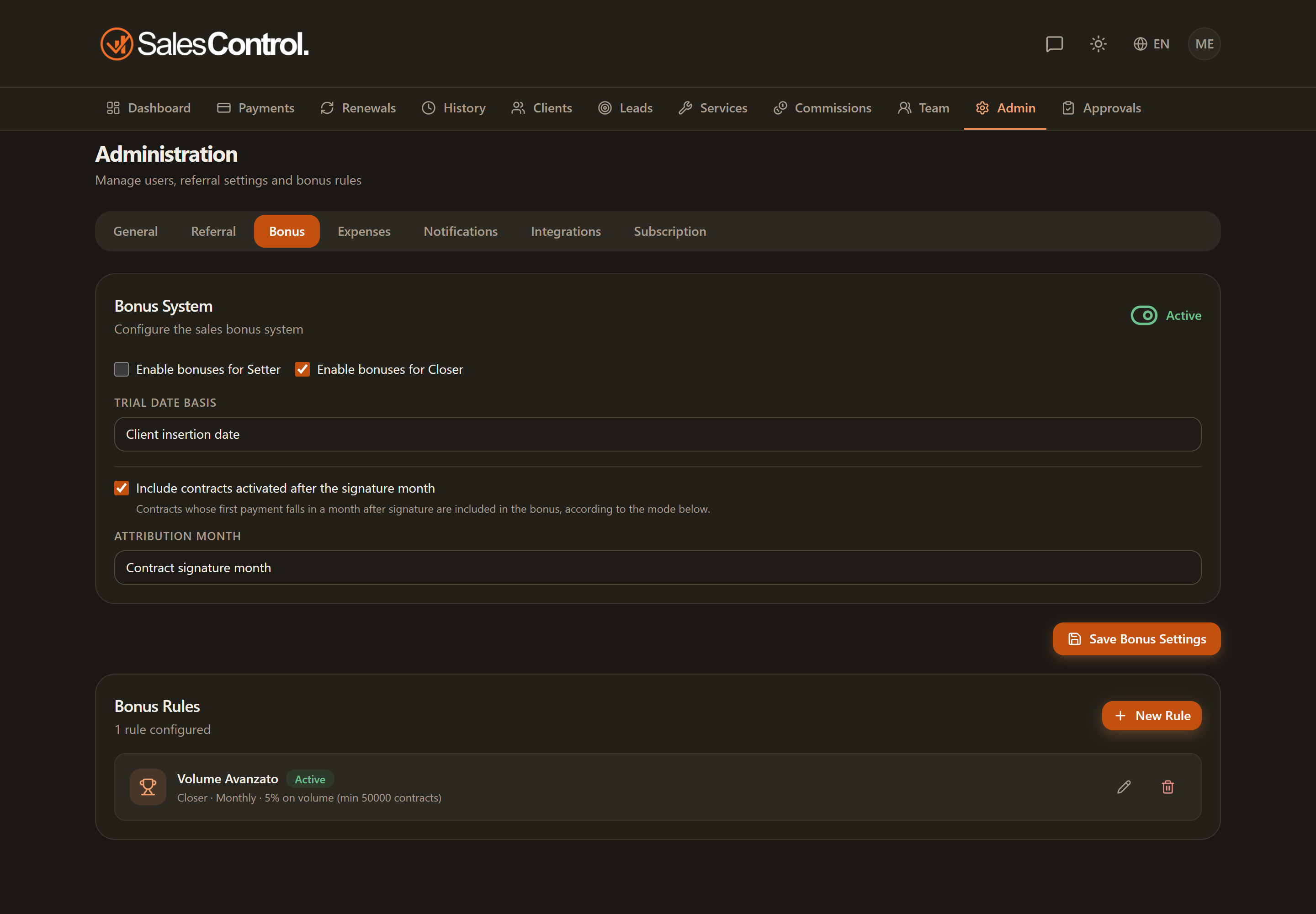
Bonus rules are found under Admin › Bonus. That is the only place where they are created and edited: you don’t go through the Commissions page (there the admin pays them, but does not configure them).
The global settings
Before the individual rules there are a few settings that apply to the entire bonus system:
- Bonus system switch — turns bonuses fully on or off for the agency.
- Target roles — choose which roles the bonuses act on (Setter and/or Closer).
- Trial date basis — sets which date to use for trial contracts (signature date, insertion date or trial confirmation date).
- Late attribution — decides what to do when a contract activates in a month other than the signature month (attribute it to the signature month or to the collection month).
Creating a new rule
With the New bonus rule button you open the creation form. The main choices are:
It is the first choice in the form: it says what the bonus is calculated on (signed contracts, signed contracts earned on collection, or cash collected). The fields below change with this choice. The three bases are explained further down.
Threshold (a fixed reward when a number of contracts is reached), Tiers (multiple levels with increasing rewards) or Volume (a percentage calculated on volume).
Indicate whether the rule rewards Setters or Closers.
Monthly, quarterly or yearly: it defines the window over which results are counted.
The rule can apply to all members of the chosen role, or be targeted at a single member (targeting).
Save and activate the rule: from that moment it contributes to the calculation of the period’s bonuses.
There can be only one active rule for each combination of type, role, period, basis and member. If you save an identical one, the form tells you and does not create it.
The bonus basis
Every rule chooses what the bonus is calculated on. Type (threshold, tiers, volume), role, period and member work the same way in all three bases.
- Signed contracts — counts the value of the contracts signed in the period, collected or not. It is the original basis: rules created before September 2026 use it. Choose it if you want to reward the signature.
- Signed contracts, earned on collection — the signatures in the period decide which contracts count, but the bonus amount grows with the payments collected on those contracts. The threshold is also measured on collections. The bonus is earned in monthly instalments: each month’s instalment updates with every payment and can be paid when the month ends. Choose it if you only want to pay on money that came in from the period’s contracts.
- Cash collected — counts the money collected in the period from the member’s clients, whatever the signature date. Trial, activation condition, deadlines and retroactivity do not exist here and the form does not show them. Choose it if you want to reward the month’s cash.
Payments count gross: a Stripe payment is worth what the client paid, before Stripe’s fees. A member who has left the agency keeps earning bonuses as long as the clients remain assigned to them.
Period close
In every basis a bonus can only be paid once its period closes. Until then, under Commissions › Bonus to Pay, you see it as Maturing, with the closing date, and the amount can still go up or down. The form asks how long to wait after the end of the period:
- Signed contracts — field “Period close (days after the end)”. With 0 the period closes on its last day. If the rule counts contracts at the first payment with a qualification deadline, the field disappears: the period closes at the deadline, because until that day a contract can still qualify. With “first instalment within 3 months” the September bonus closes on 31 December.
- Earned on collection — field “Collection window”, proposed at 90 days. Payments on the period’s contracts count if they come in by the end of the window; later ones do not count for that bonus. Each monthly instalment becomes payable at the end of its month, without waiting for the close.
- Cash collected — field “Grace days”, proposed at 0: the period closes on its last day and the bonus is payable from the next day. A few grace days give you time to record the last days’ payments before the bonus becomes payable.
Days are counted in the agency’s time zone: a payment counts until 23:59 on the last day. At the close the bonus becomes payable and the bonus achieved notification goes out. What happens if a late payment arrives afterwards or an instalment is reversed is covered in Advanced Bonus Conditions.
What counts on a cash basis
With the Cash collected basis the form shows “What counts”, with three choices:
- Every payment — new and existing clients count the same.
- New cash only — only what new clients pay in their first bonus period counts. Instalments in later periods do not count.
- Everything, with a cap on existing clients — everything counts, but cash from existing clients weighs at most the share you set (from 1 to 99%). It works like the renewals cap of the volume bonus: the existing part above the share stays out and comes back in as new cash grows.
Threshold €100,000, maximum share 20%, cash from existing clients €22,000. Existing cash can be at most one fifth of the basis. The €22,000 only count in full once total cash reaches €110,000, because €22,000 is 20% of €110,000. With less new cash, part of the €22,000 stays out.
With the Threshold type on a cash basis, the rule counts new clients whose first payment falls in the period. With the Volume type, the share set in “What counts” replaces the renewals cap, which does not appear in this basis.
New cash
New cash is everything a new client pays in their first bonus period: the month (or quarter, or year, depending on the rule) of their first payment. Within that period, a partial payment, an upsell and the difference to switch to a single payment are all new cash.
From the next period on, everything the client pays is existing cash. Payments from a renewed client are existing cash too, just like a client on their third instalment.
The first period is the calendar one. A client who pays the first instalment on the 30th of the month and the balance on the 2nd of the next month has the balance counted as existing cash.
Each bonus type has its own settings: dig into them in the article dedicated to the type you chose. The finer options (trial handling, activation condition, deadlines, retroactivity) and what happens after the close are described in Advanced Bonus Conditions.